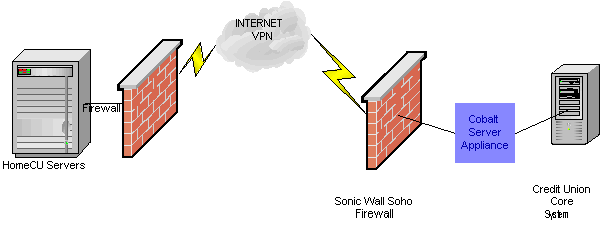
The design of our live system addresses these problems in a couple of ways. First of all, because it leverages our existing offline service, it is much more robust. If the Core System is unavailable, our system can present the member with data stored in DMS's HomeCU databases so long as it is not too out-of-date. Our live service can essentially operate for a couple of hours even if the connection to the Core System is down. Also, because when a member logs in we retreive all their data and store it in our regular databases, we don't need to re-transmit that information from the Core System unless that data has changed. The Appliance in the Credit Union's office checks the Core System each time a member makes an inquiry and it tracks whether that member's data has changed. If the data has not changed, it won't need to be re-transmitted back to our databases.
Although the logistics of communication between the Appliance and the Core System have not been finalized, ideally the Core System would listen for either an inquiry or a transaction and respond accordingly. For UNIX/Linux based Core Systems, a program that can read and write standard input and output will work best. If that is not possible, a named pipe option is available. For Windows based systems, a file method is currently the only option. For specific information on the communication methods, contact DMS, Inc. DMS will work with individual vendors to determine the best method to send requests and receive responses.
The Password field is optional. When this field is passed it is up to the Core System to validate the password. If the password fails validation, the system should return a status "001 INVALID ACCOUNT NUMBER". Once a member successfully logs into home banking, the password is stored in our database and can be changed by the member. From that point on, our system will leave the Password empty:
INQ: AccountNumber[tab]Password[tab]Cutoff\n
The Cutoff is the date of the oldest transaction to send. The Core System is expected to return transactions up to and including this date unless it is older than the Core System's maximum. The Core System should calculate a maximum amount of history that it will return (Typically, 3 months for deposit accounts and 6 months for loan accounts). A very old Cutoff will signal the Core System to return the maximum. The Cutoff date passed is in the form of yyyymmdd. This date is also required to be returned in the <Parameters> section of the return packet.
INQ: AccountNumber[tab][tab]Cutoff\n
The Appliance then expects to receive an Inquiry Packet back from the Core System. The individual record structures are the same as our offline service, however the overall file structure varies slightly.
Because the inquiry is expected as one file, we introduced headers and record separators to delimit the different record types. Records in the file follow the same format as our batch product, the general format is:
The <Parameters> and <Messages> sections are new and will be discussed below. For a complete explanation of the other record structures, refer to the Credit Union Data Processor Guidelines.
- <Inquiry>
- <Parameters>
1234567 20000101- </Parameters>
- <Member>
1234567 MyPassword- </Member>
- <Messages>
1234567 0000001 2001010314:53:01 Transaction Ok
1234567 0000002 2001010315:50:23 NSF- </Messages>
- <AccountBalance>
1234567 1 0 S Share - 1ST REG. SHARE 25.08 .27 .00 25.08 1234567 6 0 Y Draft - 1ST DRAFT 473.96 .00 .00 473.96 9001756163- </AccountBalance>
- <LoanBalance>
1234567 10 2688.16 20001113 18.81 80.64 20001020 12 Overdraft 15 14.90 8000.00 0 0 N N 1234567 FM 48524.03 20001103 .00 1803.42 20001001 12 FIRST MORTGAGE 26 7.50 90000.00 19970821 60 N N- </LoanBalance>
- <AccountHistory>
1234567 6 0 00J3001J20662807 ATM 20001111 -14.65 Withdrawal-ATM - 11/11 00:17 4275 HARRISON - OGDEN 473.96 1234567 6 0 00J3001I21121701 103 20001110 -30.87 Withdrawal-Draft 488.61 1234567 6 0 00J3001H20798877 20001109 300.00 DEPOSIT-Cash&Ck 519.48 1234567 6 0 00J3001G20782199 102 20001109 -35.25 Withdrawal-Draft 219.48 1234567 6 0 00J3001F21338132 20001107 50.00 DEPOSIT-Check 254.73 1234567 6 0 00J3001E21020328 DRCARD 20001107 -13.80 Withdrawal - AMOCO 07563976 - OGDEN, U 204.73- </AccountHistory>
- <LoanHistory>
1234567 6 00J3005E10996100 20001113 -698.51 .00 LOAN PAYMENT -Transfer from: 7701/6 .00 1234567 7 00J3005430592258 20001113 -12.61 .02 LOAN PAYMENT -Transfer from: 7068/7 .00 1234567 6 00J3004Z30589328 20001113 -.17 .00 LOAN PAYMENT -Transfer from: 7068/6 .00 1234567 UA 00J3004S30046589 20001113 -2720.73 7.07 PAYMENT-Chec k .00- </LoanHistory>
- </Inquiry>
EOT
In the event an error is encountered; the return packet would contain a status record instead. The 3 fields are AccountNumber, StatusCode and StatusDescription.
An example would be:
The packet cutoff date represents the earliest date for which information is to be retrieved. The Core System should return all account balance, loan balance, and message information, plus account history and loan history transactions dated on or after the requested cutoff date unless it is older than the Core System's maximum. The Core System should calculate a maximum amount of history that it will return (Typically, 3 months for deposit accounts and 6 months for loan accounts). A very old Cutoff will signal the Core System to return the maximum.
The return packet must include a
When the packet is loaded in the database, all transactions dated on or after the returned cutoff date will be deleted, then the new transactions are loaded. To avoid duplicate key errors the cutoff date must not be newer than any transaction date in the packet. Also, to avoid "holes" in the member data, the packet should contain all Core System transactions dated on or after the cutoff.
A default cutoff date, expressed in terms of the number of days to retrieve, is set in the HomeCU database for each Credit Union. This date represents the number of days for which data will be requested when a returning member logs into the Home Banking site. Thirty days is usually sufficient for this default inquiry date.
The Core System should also set a 'maximum history' number of days to return. If the cutoff date requested in the Inquiry packet is older than the maximum amount of history set by the Core System, the Core System should return its maximum and set the date returned in the <Parameters> section accordingly.
For instance, when the HomeCU system requests all history for a member, it will pass a cutoff date of 2000-01-01. In this case, the Core System would return 90 days of history, if that was the maximum.
A transaction from the Appliance to the Core System will look like this:
Here is the transaction record:
The return packet from a transaction will simply state whether the transaction was received successfully and any status messages returned to the member will be via the
<Messages>
section of the Inquiry Packet.
The return packet should be formatted like this with the status codes the same as above:
The <Messages> section also opens up an avenue for the Credit Union to send messages to individual members as well.
Since the messages will essentially be presented to the members "mailbox," a Core System vendor could allow the Credit Union to send messages to members via the <Messages> section.
The records in the <Messages> section consist of three fields: a Message I.D., Timestamp and Message Text.
The Message I.D. can be any string up to 15 characters long and must uniquely identify that message for that member.
The timestamp is 20 characters long and is used to order the messages when presenting them to the member.
The timestamp field is not necessarily a date and time field, but it should be set to something that sorts the messages in order of occurrence.
We recommend setting the field to CCYY/MM/DD HH:MM:SS or the message I.D., if that is sequential.
The Message Text can be up to 255 characters long.
Message Records Field Type Comments AccountNumber Char(12) Member Account Number. Message ID Char(15) A uniq message identifier for this message. It must be uniq per member. TimeStamp Char(20) Used to sort the messages presented to the member. We recommend CCYY/MM/DD HH:MM:SS.
Message Text Char(255) The text of this message. (e.g. "Your transfer was completed.")
12345 099 SYSTEM TEMPORARILY UNAVAILABLE
Status Codes
000 NO ERROR 001 INVALID ACCOUNT NUMBER 003 ACCOUNT CLOSED 099 SYSTEM TEMPORARILY UNAVAILABLE
Parameters Section and Cutoff Date
The <Parameters> section contains one record consisting of two fields: a Member Number and Cutoff Date. The Cutoff Date is presented in CCYYMMDD format.
12345 20020227
Transaction Request
The transaction system will receive member transfers via the web and forward them to the Core System through the Appliance.
The Appliance will communicate to the Core System by the same means as the Inquiry system.
Essentially, the Appliance will pass a transaction request to the Core System and expect to get a status packet returned.
TRN: AccountNumber[tab]TransactionCode[tab]Reference1[tab]Reference2[tab]Reference3[tab]Reference4[tab]Referenc5[tab]Amount
Transaction Record
AccountNumber The Member Number TransactionCode
Transaction Codes
AT Account Transfer LP Loan Payment LA Loan Addon CW Check Withdrawal from a deposit account LC Check Withdrawal from a loan add-on CP Credit Card Payment MD Message Delete MA Member Activation ES Electronic Statement Activation SP Stop Payment Request Reference1
For transfers between accounts, Reference1 is the account suffix or loan number for the "from" side. For a "Message Delete" (MD) transaction, this is the Message I.D.
For "Member Activation" (MA) transactions, this is the first field required by the credit union to authenticate the member (e.g. Social Security Number).
For Stop Payment (SP) transactions, this is the account suffix of the draft account.
Reference2 For transfers between accounts, Reference2 is the account suffix or loan number for the "to" side. For CW, LC, CP, MD and ES this field will be blank.
For MA transactions, this field will be the second field required by the credit union to authenticate the member (e.g. Birth Date).
For SP transactions this field is the draft number to be stopped.
Reference3 This field will hold the email address (if any) provided by the member.
Reference4
Additional Credit Union-specific value for LP transactions. Available on an as-needed basis.
Reference5
Cross-Account Transfer "To" Member number
Amount Amount of the Transaction or Withdrawal. For MD transactions, this field will be zero or blank. For SP transactions this field will be the amount of the draft, if known, or zero.
12345 099 SYSTEM TEMPORARILY UNAVAILABLE
Message Mechanism
Since member transactions may not get completed immediately, there needs to be a mechanism to inform the member when a transaction is complete. Our solution is to only expect to get back from the Core System whether the transaction was received, not whether it was actually processed. The results of a processed transaction will be returned to the member in subsequent Inquiry Packets by way of the <Messages> section.
It is our plan that Messages are ultimately stored on the Core System. When an inquiry is requested, all Messages for that member are returned. When a member
removes a message on the web, a transaction to remove that message is sent to the Core System.
All contents copyright © 2000 Database Management Services Inc.
Important Notices.